Searching files in a Directory using .Net Framework
.Net framework’s Directory class of system.io namespace provides a static method GetFiles to search the files of a particular directory. Here is the static method detail - 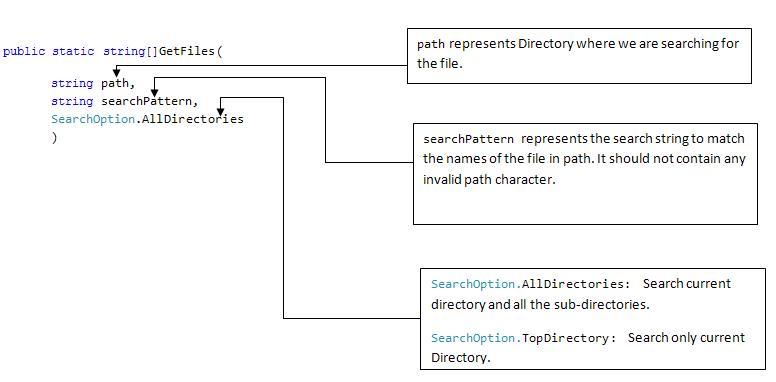 Using the code snippet we can find all the files of the directory specified in path -string[] paths = Directory.GetFiles(path, stringsearchPattern, SearchOption.AllDirectories); Here depending on the stringsearchPattern , directory mentioned in path and it sub-directories will be searched and depending on the result , one array of string containing the file paths will be returned. About searchPattern, it could contain any string. But the allowed wildcard characters are - *(zero/more character) and ?(exactly zero or more character).For example –1. “.txt” returns files having .txt extension.
2. “ If we search using “*.txt” – it gonna match with every one of them. We will get same kind of result for “*htm” search pattern– which will match files with extensions- *htm and *html. I don’t know the exact reason behind it and I will update about it if I get to know that.
Using the code snippet we can find all the files of the directory specified in path -string[] paths = Directory.GetFiles(path, stringsearchPattern, SearchOption.AllDirectories); Here depending on the stringsearchPattern , directory mentioned in path and it sub-directories will be searched and depending on the result , one array of string containing the file paths will be returned. About searchPattern, it could contain any string. But the allowed wildcard characters are - *(zero/more character) and ?(exactly zero or more character).For example –1. “.txt” returns files having .txt extension.2. “
.?xt” returns files having extension .xt , .axt , .bxt and so on.
Be careful about one anomaly in searchPattern, if you write “.txt” as search pattern , it gonna consider it like “.txt*” – that is let’s consider following folders-If we search using “*.txt” – it gonna match with every one of them. We will get same kind of result for “*htm” search pattern– which will match files with extensions- *htm and *html. I don’t know the exact reason behind it and I will update about it if I get to know that. In addition, searchPattern in GetFiles() does not support multiple filters which we may require if we want our GetFiles() functions to return ,let’s say, all the “*txt” and “.htm” files. Iteratively searching individual files could be one easy way to solve this problem.
For more information – visit http://msdn2.microsoft.com/en-us/library/ms143316.aspx .
Comments ()